| 1. | Introduction to C++ |
| 2. | Variables, branching, and loops |
| 3. | Functions and recursions |
| 4. | Pointers |
| 5. | Linked lists |
| 6. | Stacks |
| 7. | Sequences |
| 8. | Pointers practice |
| 9. | References |
| 10. | Sorting |
| 11. | Object oriented programming |
| 12. | Trees in C++ |
| 13. | Balanced trees |
| 14. | Sets and maps: simplified |
| 15. | Sets and maps: standard |
| 16. | Dynamic programming |
| 17. | Vectors |
| 18. | Multi core programming and threads |
| 19. | Representation of integers in computers |
| 20. | Floating point representation |
| 21. | Templates |
| 22. | Inheritance |
| 23. | Pointers to functions |
9. References
1. Introduction to references
We use names such as x and y to access the locations in memory.
The command int x; is a request issued to the computer to give us a piece of RAM memory sufficient to hold one integer. We also inform the computer that we will use the name x for the content of this memory.
If after the above command we issue the command int &y=x; we are asking the computer to allow us to use the name y as well as the name x for the content of the memory location that was allocated by the command int x;.
This may look strange and useless at the moment. We will see later some amazing consequences of this ability to use different names for memory locations.
Let us now summarize the meanings of the instructions that are used to declare variables.
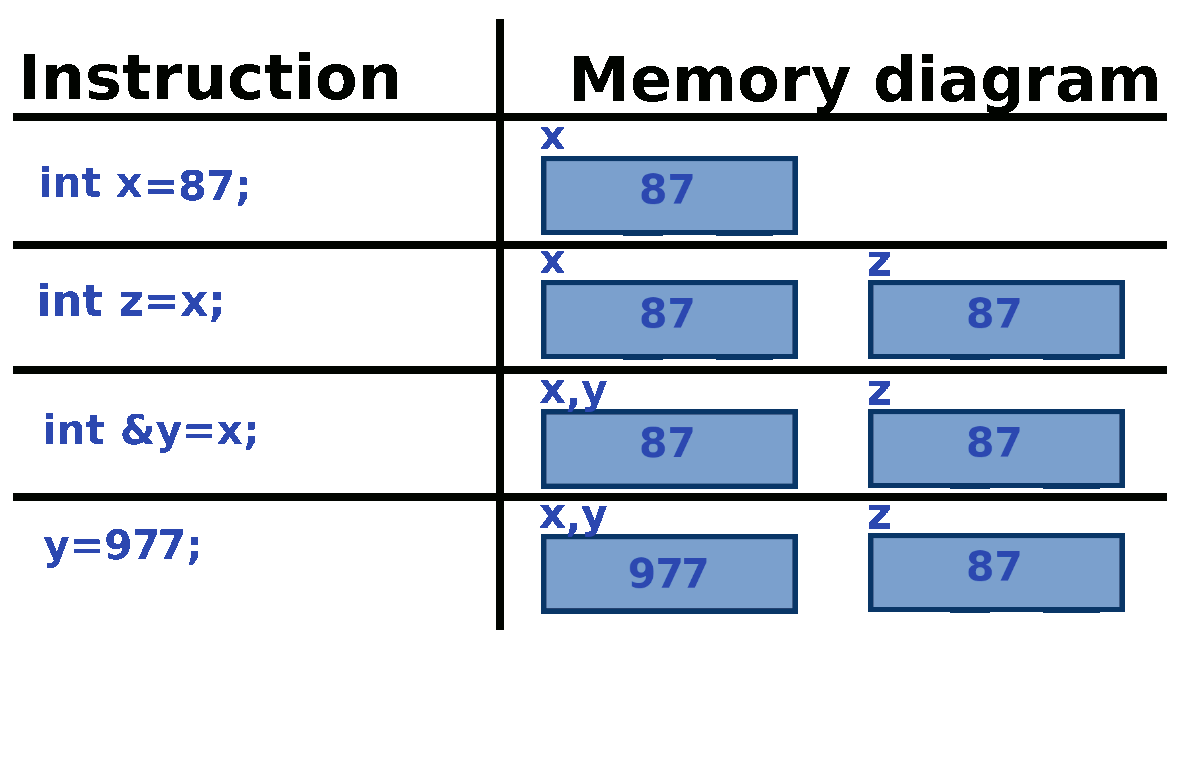
Let us now analyze the memory diagram for the following code that consists of four instructions.
int x=87;
int z=x;
int& y=x;
y=977;
The picture below shows how the memory diagram is updated after each of the instructions.
#include<iostream>
int main(){
   int x=87;
   int z=x;
   int &y=x;
   y=977;
   std::cout<<1000000*x+1000*y+z<<"\n";
   return 0;
}
2. Analysis of addresses
We will now see that the variable and its reference share the same address. The variable y will be defined as a reference to x. We will print the addresses of x and y and see that they are the same.
 #include <iostream>
int main(){
   int x;
   int& y=x;
   x=27;
   std::cout<< "x="<< x<< ". y="<< y<< ". &x=";
   std::cout<< (long)(&x)<< ". &y=";
   std::cout<< (long)(&y)<< "."<< std::endl;
   std::cout<< "Modification of y"<< std::endl;
   y=37;
   std::cout<< "x="<< x<< ". y="<< y<< ". &x=";
   std::cout<< (long)(&x)<< ". &y=";
   std::cout<< (long)(&y)<< "."<< std::endl;
   return 0;
}
The output of the program indicates that x and y have the same value and that their addresses in the memory are the same. The command x=27 updates the memory location whose name is x. The memory location with the name y is the very same as the one with the name x. Thus, when we print y we see the same number \(27\). Later on, when we make the change y=37, we observe that x is changed as well.
Let us point out that reference must be initialized upon declaration. The command int myNumber=37; can be replaced by two commands
int myNumber;
myNumber=37;
However, the same cannot be done with
int& y=x;. Also, we cannot initialize the reference using numbers int& y=37. During the initialization we must provide a variable that corresponds to the physical location in the memory (also known as L-value because it can be on the left side of the assignment operator).
3. Parameters of functions
We have learned how to use pointers to create mutator functions. Those are the functions capable of changing their parameters. References also offer a way to accomplish this task.
Before we can do that, we need to fully clarify the mechanism of function calls.
Let us first identify the following four categories of functions:
- Category 1: Functions with no parameters and no return instruction
- Category 2: Functions with parameters but no return instruction
- Category 3: Functions with no parameters but with return instruction
- Category 4: Functions with parameters and with return instruction
In this document we will analyze in great details the functions in categories 1 and 2. We have used the functions in categories 3 and 4, but we will fully understand the mechanics of return statement once we learn about classes and move semantics.
3.1. Functions without parameters and without return instructions
We will analyze a code in which a fairly simple function is called from the main.
#include<iostream>
void simplestFunction(){
   std::cout<< "Executing easy function"<< std::endl;
}
int main(){
   std::cout<< "Printing before the function."<< std::endl;
   simplestFunction();
   std::cout<< "Printing after the function."<< std::endl;
   return 0;
}
The previous code is equivalent to the one in which the command simpleFunction(); is replaced by the block of code
{
   std::cout<< "Executing easy function"<< std::endl;
}
Any local variable defined inside the function would behave as a local variable defined inside a block of code surrounded by { and }: it would cease to exist after the block.
3.2. Function with parameter(s) and no return value
Our next example is the function that has one parameter x of type int.
#include<iostream>
void lessSimpleFunction(int x){
   std::cout<< "Executing function with x="<< x<< std::endl;
}
int main(){
   std::cout<< "Printing before the function."<< std::endl;
   lessSimpleFunction(7);
   std::cout<< "Printing after the function."<< std::endl;
   return 0;
}
The line lessSimpleFunction(7) is replaced by the code from the declaration of the function (i.e. the code between { and }). However, one line is added at the beginning of the code: int x=7;. The line is obtained by copying the statement between ( and ) of the declaration and adding =7 to it. Thus the above code is equivalent to
#include<iostream>
int main(){
   std::cout<< "Printing before the function."<< std::endl;
   {
      int x=7;
      std::cout<< "Executing function with x="<< x<< std::endl;
   }
   std::cout<< "Printing after the function."<< std::endl;
   return 0;
}
Therefore the line with parameters of functions is copied to the very beginning of the block of the code and the parameters are initialized with the values provided in the function call.
3.3. Function with references in the parameter line
We could have placed int& x in the parameter line of the function. The same rule of replacement from previous section would apply in this situation.
#include<iostream>
void lessSimpleFunction(int& x){
   std::cout<< "Executing function with x="<< x<< std::endl;
   x=20;
   std::cout<< "I changed x to x="<< x<< std::endl;
}
int main(){
   int z=7;
   std::cout<< "Printing before the function."<< std::endl;
   lessSimpleFunction(z);
   std::cout<< "Printing after the function. ";
   std::cout<<"The variable z became z="<< z<< std::endl;
   return 0;
}
The previous code is equivalent to the following one:
#include<iostream>
int main(){
   int z=7;
   std::cout<< "Printing before the function."<< std::endl;
   {
      int& x=z; //This line is due to the parameter line lessSimpleFunction(int& x)
      std::cout<< "Executing function with x="<< x<< std::endl;
      x=20;
      std::cout<< "I changed x to x="<< x<< std::endl;
   }
   std::cout<< "Printing after the function. ";
   std::cout<<"The variable z became z="<< z<< std::endl;
   return 0;
}
The function lessSimpleFunction is a mutator. It changes the parameter x.