| No. | Title and link |
|---|---|
| 1. | Introduction to C++ |
| 2. | Variables, branching, and loops |
| 3. | Functions and recursions |
| 4. | Pointers |
| 5. | Linked lists |
| 6. | Stacks |
| 7. | Sequences |
| 8. | Pointers practice |
| 9. | References |
| 10. | Sorting |
| 11. | Object oriented programming |
| 12. | Trees in C++ |
| 13. | Balanced trees |
| 14. | Sets and maps: simplified |
| 15. | Sets and maps: standard |
| 16. | Dynamic programming |
| 17. | Vectors |
| 18. | Representation of integers in computers |
| 19. | Floating point representation |
| 20. | Templates |
| 21. | Inheritance |
| 22. | Pointers to functions |
| 23. | Multi core programming and threads |
| 24. | Reading data from internet |
| 25. | Graphic cards and OpenCL |
| 26. | OpenCL on AWS |
| 27. | OpenCV and optical mark recognition |
5. Linked Lists
1. Introduction
A linked list can store a large amount of data. Once data is added to the list, the list can be further extended by adding more data. Linked lists are very useful when the size of the data is unknown in advance. The size of the list can be dynamically determined and updated by the user during program execution.
Here is an example of a problem that is best solved using a linked list.
-9. After entering -9, the user provides one more positive integer, q. The program must add q to each of the previously entered integers and print the updated integers in the same order they were received.
Before creating programs that use linked lists, we must first learn about structures in C++.
2. Structures
We will now learn how to create more complex data types with multiple components. So far, we have written programs using basic data types such as int, long, double, and std::string.
The struct keyword allows us to define custom data types, which can then be used in our program.
One example of such a structure is Mountain, which consists of three components: name, height, and location. The declaration is done as follows:
struct Mountain{
   std::string name;
   double height;
   std::string location;
};
Remark: The declaration must end with semicolon (;).
If the declaration is placed before the main() function and all other functions, we are allowed to use the following command
Mountain x;
The command will ask the computer to give us sufficient memory for one mountain and allow us to call it x. We can access the individual components name, height, and location by typing x.name, x.height, and x.location.
Below is an example of a program that uses the newly created Mountain structure.
#include<iostream>
struct Mountain{
   std::string name;
   double height;
   std::string location;
};
void printData(Mountain m){
   std::cout << m.name << " on ";
   std::cout << m.location << " has height ";
   std::cout<< m.height << " meters.\n";
}
int main(){
   Mountain x;
   Mountain y;
   x.name="Mount Everest"; x.height=8848.13; x.location="Earth";
   y.name="Olympus Mons"; y.height=21287.4; y.location="Mars";
   printData(x);
   printData(y);
   return 0;
}
2.1. Structures: practice problems
Create the function tallerMountain that has two parameters a and b of type Mountain. The function should return the height of the taller of the two mountains.
You should only write the code that replaces the text // ??? //.
double tallerMountain(Mountain a, Mountain b){
   // ??? //
}
Create the function tallerMountain that has two parameters a and b of type Mountain. The function should return the name of the taller of the two mountains.
You should only write the code that replaces the text // ??? //.
std::string tallerMountain(Mountain a, Mountain b){
   // ??? //
}
3. List node
The main ingredient of a linked list is an object of the structure ListNode. A list node consists of two pieces of data: content and a pointer, aNext, which stores the address of the next element in the list.
The declaration of the structure is
struct ListNode{
   long content;
   ListNode *aNext;
};
When the user enters integers, we will store them in a linked list. The list will be identified by a pointer to its first element, called aHead. The last node in the list will have a special value, nullptr, assigned to its aNext component. The value nullptr indicates that we have reached the end of the list, as it points to nowhere. The ListNode is declared as follows:
ListNode *aHead;
4. Visual representation
Algorithms that use linked lists require careful drawing of memory diagrams. Even tiny mistakes can result in pointers containing incorrect addresses. Accessing an invalid address may cause programs to behave unexpectedly or crash.
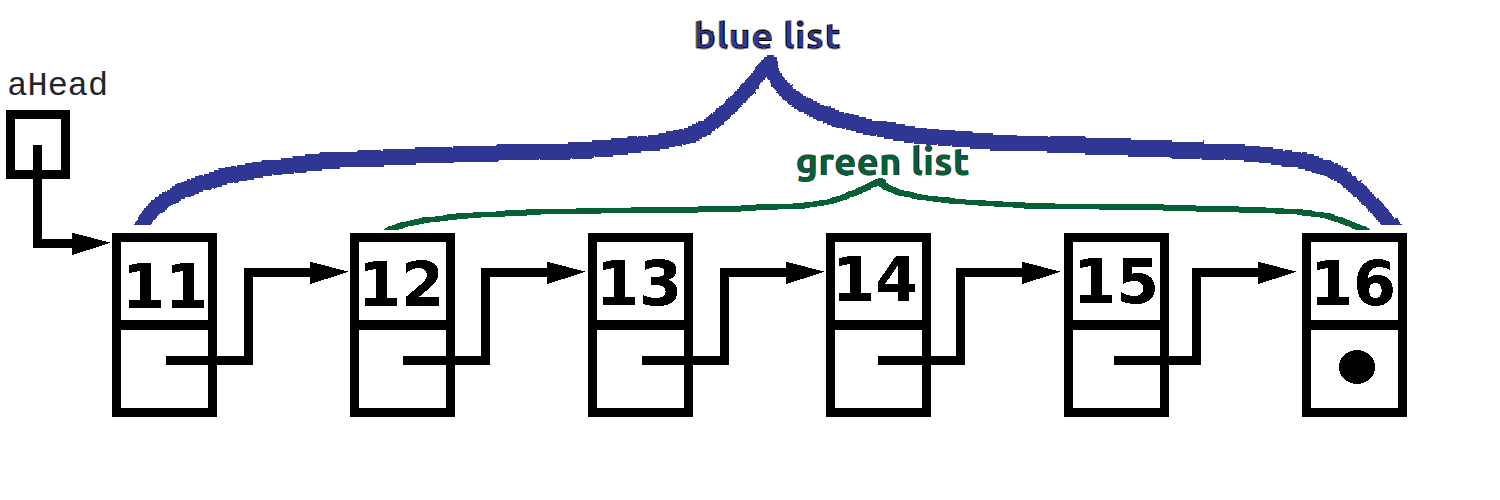
Each node in a linked list has two distinct components. The first is content, which simply holds a value and does not require special drawing skills - we just write the value. The second component of a node is a pointer. The pointer contains an address. These addresses are typically large, seemingly random numbers. So, instead of writing out these big numbers, we represent pointers using arrows in our diagrams.
The picture above illustrates a linked list containing nodes with the values 11, 12, 13, 14, 15, and 16.
The first element in our diagram is the variable aHead, which is a pointer. The pointer contains the address of the first node - the node containing 11. The variable aHead is represented as a box, with an arrow pointing from the box to the first node in the list.
The second element in our drawing is the first node. This node contains the value 11, and its second component holds the address of the node containing 12. We represent this by drawing an arrow from the second component to the node that contains 12.
The same approach is used for the remaining nodes with values 12, 13, 14, and 15. Each node contains its respective value, and its pointer component directs to the next node in the list.
The last node, which contains 16, is slightly different. Like all other nodes, it consists of two components. However, its pointer component holds a special value called nullptr, indicating the end of the list. In our diagram, we represent nullptr with a thick dot.
If addressOfANode is a pointer to a node in the list, we can check if it is the last node using the following instruction:
if( (*addressOfANode).aNext == nullptr ){
   std::cout<<"The last node\n";
}
else{
   std::cout<<"Not the last node\n";
}
5. Simple problems
Any program using linked lists requires constructing the list first. The code for creating a linked list is somewhat lengthy. In this section, however, the auto-grader will handle the list construction.
The problems will focus on creating simple functions. These functions will receive pointers to the heads of the linked lists, which will already be created and properly filled with data. Our task will be to implement specific operations on these lists.
Create a function contentOfTheHead that returns the content of the head of the linked list. The parameter of the function is aHead. It is the pointer that contains the address of the head. If the function receives the nullptr, then the function should return -777. However, if the function receives a pointer to the head of a real linked list, then it should return the content. Your code should replace the text // ??? // below.
long contentOfTheHead(ListNode* aHead){
   if(aHead==nullptr){return -777;}
   // ??? //
}
Create a function contentOfTheSecondNode that returns the content of the second node of the linked list. The parameter of the function is aHead. It is the pointer that contains the address of the head. If the function receives the nullptr, then the function should return -777. However, if the function receives a pointer to the head of a real linked list, then it should check whether the list has another node. If it does not, then the function should return -555. If has at least two nodes, then the function should return the content of the second node. Your code should replace the text // ??? // below.
long contentOfTheSecondNode(ListNode* aHead){
   // ??? //
}
Create a function contentOfTheHeadIfItIsTheLastNode that returns the content of the head, if the head is also the last node of the linked list. The parameter of the function is aHead. It is the pointer that contains the address of the head. If the function receives the nullptr, then the function should return -777. However, if the function receives a pointer to the head of a real linked list, then it should check whether the head of the list is the last node as well. If it is, then the function should return the content of the head. If the head is not the last node, i.e. the list has at least two nodes, then the function should return -222. Your code should replace the text // ??? // below.
long contentOfTheHeadIfItIsTheLastNode(ListNode* aHead){
   // ??? //
}
Create a function contentOfTheLastNode that returns the content of the last node of the linked list. The parameter of the function is aHead. It is the pointer that contains the address of the head. If the function receives the nullptr, then the function should return -777. However, if the function receives a pointer to the head of a real linked list, then it should find the last node and return its content. Your code should replace the text // ??? // below.
long contentOfTheLastNode(ListNode* aHead){
   // ??? //
}
6. Creating list from user input
We will now solve the problem 1.
The user enters integers one by one. The input is over when the user decides to enter -9. After this number -9, the user gives one more positive integer q. The program needs to add q to each of the integers and then print the new updated integers in the same order in which they were received.
In the main function we will declare a variable aHead of type ListNode*.
ListNode* aHead;
After the declaration above, the pointer aHead is not initialized. When the user enters the first number (which we will call input), we allocate memory for the first ListNode and set its content to input.
Since this is the only element in the list at the beginning, we assign nullptr
to its aNext component, indicating that it is both the first and last element in the list. The following code handles the input and initialization of the first element in the list:
int userInput;
ListNode* aHead;
std::cout << "Insert the first element of the list: ";
std::cin>>userInput;
aHead=new ListNode;
(*aHead).content=userInput;
(*aHead).aNext=nullptr;
The user needs to provide the remaining elements of the list. Since we must preserve the address of the first element (aHead), we introduce a new pointer variable to help with list construction. We will call this pointer runner.
The runner pointer keeps track of the last element added to the list. Some people refer to it as the tail. Initially, runner should point to the same location as aHead, ensuring both pointers reference the first node.
This is accomplished with the following statement:
ListNode *runner;
runner=aHead;
When the user provides the next value in userInput, we first check whether it is -9. If it is, we do not add it to the list; instead, we end the data entry process.
If userInput is a value other than -9, we create a new node with userInput as its content. We also need to link this new node to the end of the current list. Since runner keeps track of the last node, our while loop should be structured as follows:
while(userInput!=-9){
   std::cout << "Insert an element of the list (-9 for the end): ";
   std::cin>>userInput;
   if(userInput!=-9){
      // *runner is the last node in the list (tail)
      // (*runner).aNext is currently nullptr
      // We now allocate new memory for ListNode and make
      // (*runner).aNext to contain the address
      // of this new ListNode
      (*runner).aNext=new ListNode;

      // runner is no more pointing to the tail
      // The next line updates the runner to point
      // to the newly created tail
      runner=(*runner).aNext;

      // We now set the content of the tail
      (*runner).content=userInput;
      // and make sure that the tail‘s pointer
      // to the the next is set to nullptr
      (*runner).aNext=nullptr;
   }
}
Once the list is created, we will read another integer, q. Starting from aHead, we will traverse the list, add q to each element, and print the updated values to standard output.
long q;
std::cout<<"Insert q\n";
std::cin>>q;
std::cout << "List printout: " << std::endl;
runner=aHead;
while(runner!=nullptr){
    std::cout << q+(*runner).content << " ";
    runner=(*runner).aNext;
}
std::cout << std::endl;
The final task is to free the memory occupied by the linked list. This time, we need to start from the back of the list and delete the nodes. This can be elegantly accomplished using recursion.
In each recursive call, we follow these two actions in this exact order:
Step 1. clean the tail
Step 2. delete the memory occupied by the current head.
Notice how
Step 1
is particularly tricky. The recursion ensures that we first clean the deepest nodes before deleting the current node.
We need to create a function called freeTheMemory and apply it to head. The function is structured as follows:
void freeTheMemory(ListNode *runner){
   if( runner!=nullptr){
      freeTheMemory((*runner).aNext);
      delete runner;
   }
}
The complete code is provided below. You may notice that compiling the code requires the addition of the -std=c++11 compiler flag. This is necessary because we are using nullptr, which is supported only in the C++11 standard. More details are given below.
Remark:
The keyword nullptr was introduced in C++11. In traditional C++, the number 0 was used to represent a null pointer. For improved clarity, programmers were also allowed to use the word NULL, which was essentially replaced by 0 during pre-processing by the compiler.
Since we are following best programming practices, we will avoid using NULL or 0 for pointers. Instead, we will use nullptr. However, this requires us to enable the C++11 standard during compilation by using the appropriate compiler flag. As a result, you will notice a slight change in our compiler directive.
// linkedList.cpp
// compile with
// c++ linkedList.cpp -o lList -std=c++11
// execute with
// ./lList
#include <iostream>
struct ListNode{
   long content;
   ListNode* aNext;
};
void freeTheMemory(ListNode *runner){
   if( runner!=nullptr){
      freeTheMemory((*runner).aNext);
      delete runner;
   }
}
int main(){
   int userInput;
   ListNode* aHead;
   std::cout << "Insert the first element of the list: ";
   std::cin>>userInput;
   aHead=new ListNode;
   (*aHead).content=userInput;
   (*aHead).aNext=nullptr;
   ListNode* runner;
   runner=aHead;
   while(userInput!=-9){
      std::cout << "Insert an element of the list (-9 for the end): ";
      std::cin>>userInput;
      if(userInput!=-9){
         (*runner).aNext=new ListNode;
         runner=(*runner).aNext;
         (*runner).content=userInput;
         (*runner).aNext=nullptr;
      }
   }
   long q;
   std::cout<<"Insert q\n";
   std::cin>>q;
   std::cout << "List printout: " << std::endl;
   runner=aHead;
   while(runner!=nullptr){
      std::cout << q+(*runner).content << " ";
      runner=(*runner).aNext;
   }
   std::cout << std::endl;
   // FREEING THE MEMORY
   freeTheMemory(aHead);
   return 0;
}
Note. Equivalent form of (*runner).content is runner->content.
The first version, (*runner).code is considered less elegant. However, it is preferred while learning the language and this website will have a lot of (*runner).code commands. Once you become a more advanced user of C++, you may decide that switching to runner->content is necessary due to peer pressure.
The user input consists of integers. The input -9 is the end, and unless it is the first integer, it is not to be considered the part of the input. Create a linked list from the numbers that the user has entered. The user enters another integer. If this integer is in the list, delete its first occurrence from the list and print the remaining list. If it is not in the list, print the original list.
7. Practice problems
The user enters the integers though the standard input. The input -9 is the end, and unless it is the first integer, it is not to be considered the part of the input. Create a linked list from the numbers that the user has entered. The user enters another integer. If this integer is in the list, delete its last occurrence from the list and print the remaining list. If it is not in the list, print the original list.
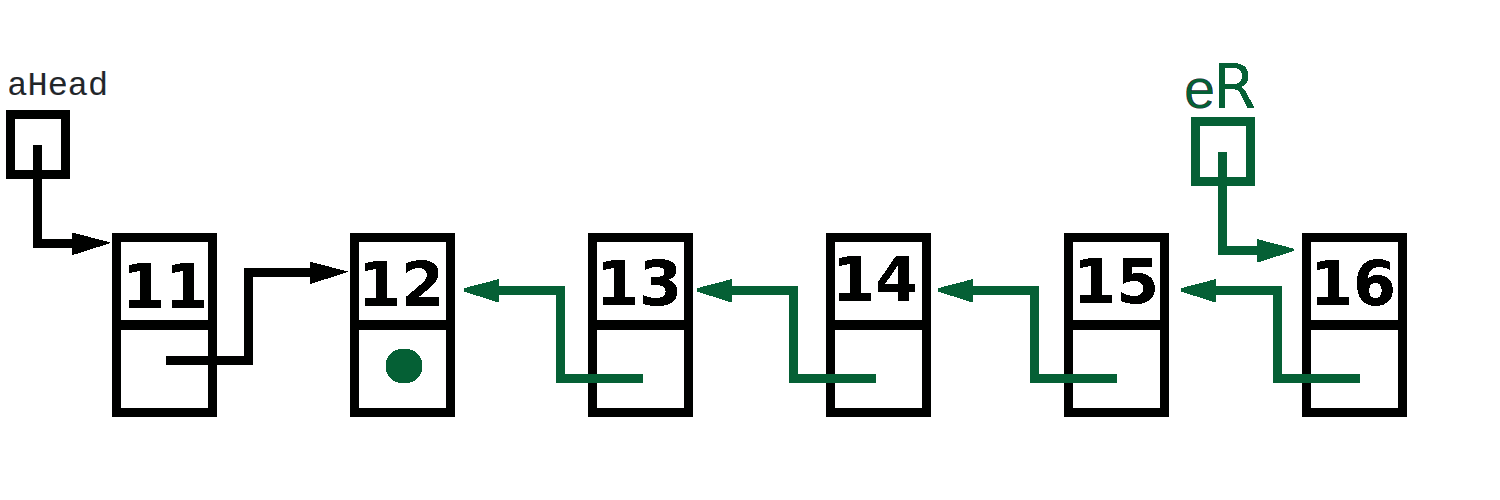
Create a function that reverses the nodes in the linked list.