| 1. | ARM 64-bit Assembly |
| 2. | Simplest programs |
| 3. | Integers |
| 4. | Main memory |
| 5. | Arrays |
| 6. | Branching and loops |
| 7. | Functions |
| 8. | Floating point |
4. Main Memory in Assembly Language
1. Main memory
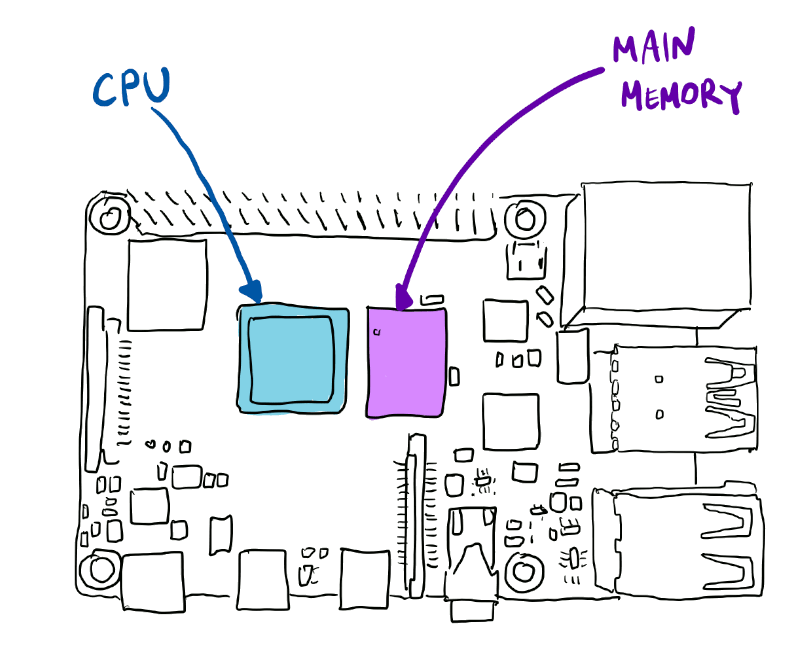
The registers X0, X1, ..., X29, LR, and SP are located inside the CPU.
The arithmetic and logic operations can only be performed on registers. Since the number of registers is relatively small, they are not sufficient for most of the programs.
The computer has a larger memory, called main memory. Main memory is often called RAM, which stands for Random Access Memory. The main memory can store large quantities of data.
1.1. Main memory in high-level languages
The programmers in high-level languages use numerous variables. The programmers behave as if their variables a, b, and c live in the main memory. They are allowed to believe that the command c=a+b; causes the numbers a and b from the main memory to be added and that the sum will appear in the variable c which is also located in the main memory.
1.2. Main memory in assembly language
The programmers in assembly language cannot perform advanced operations in main memory. When they want to add two numbers a and b from the main memory, they have to request the transfer of data from the main memory to registers. For example, they can transfer the content of the variable a to the register X7 and the content of the variable b to the register X8. Once the numbers are in registers, the instruction ADD X9, X7, X8 can be used to add the two values. Finally, the sum has to be transferred from the register X9 to the location in main memory that is occupied by the variable c.
1.3. Addresses
We mentioned before that the assembly language lacks one of the major conveniences of the high-level languages. We can't use the names for variables. We can access the variables in the main memory only if we know their addresses.
The main memory is divided into blocks. Each block has its address. Even in high-level languages we can read those addresses. Here is one example of a program in C++ that declares a variable called numberX and prints its address.
#include<iostream>
int main(){
  long numberX;
  std::cout<<(long)(&numberX)<<"\n";
  return 0;
}
If we save the above program in a file addressExample.cpp, compile the code with the command c++ addressExample.cpp -o ae, and execute it with the command ./ae, we will see an output that looks like this:
140726929160704The command
long numberX; in C++ asks the computer to give us sufficient memory for one integer of type long and to allow us to use the name numberX for that memory. The computer gave us a memory at the address 140726929160704. If we ran the program again, the address will be different.
2. Instruction LDR
2.1. Description of LDR
The instruction LDR is used to load the content from the main memory into a register. Let us assume that the variable numberX in main memory contains a number that we want to transfer to the register X28.
We must know the address of the variable numberX. Without the address, we can't make the transfer. The variables in the main memory do not have names. They only have addresses. So, the name numberX cannot be used by important instructions in the assembly language.
Assume that we somehow figured out what is the address of numberX. Assume that we managed to store the address in the register X1. Then, we can load the content of numberX into the register X28. This is the instruction that performs the loading
LDR X28, [X1]
2.2. LDR practice with code auto-grader
We will first present one solved problem that illustrates the instruction LDR. Then we will have two exercises that can be solved and tested on code auto-grader.
X1 contains the address of a variable numberX. Assume that the register X2 contains the address of the variable numberY. Calculate the sum numberX+numberY and place the result in the register X0.
Assume that the registers X1 and X2 contain the addresses of two integer variables a and b in the main memory. Write the code that calculates \(5a^2-3b\) and stores the result in the register X0.
Assume that the registers X1 and X2 contain the addresses of two integer variables a and b in the main memory. Write the code that evaluates \(a^2-2ab-15b^2\) and stores the result in the register X0.
2.3. LDR practice on Raspberry Pi
We will now write a complete program that can be executed on Raspberry Pi 4. The program will do a task similar to the one from problem 1.
We are still not ready to write programs that read from user input. This simple problem will have two variables numberX and numberY initialized to values 20 and 70. The variables will be placed in .data section of our code. They will occupy the space in the main memory that is adjacent to the space occupied by the program itself. However, we can read their addresses by writing =numberX and =numberY.
.data
.balign 8
numberX: .word 20
.balign 8
numberY: .word 70
.text
.global main
main:
   LDR     X1,      =numberX
   LDR     X2,      =numberY
   LDR     X28,     [X1]
   LDR     X29,     [X2]
   ADD     X0,      X28,     X29
   RET
3. Instruction STR
The content from a register can be stored in a main memory with the instruction STR. Assume that numberZ is a variable in the main memory. Assume that the register X1 contains the address of the variable numberZ. If we want to copy the content of the register X2 and store it in the variable numberZ, we need to give the following instruction
STR X2, [X1]
Assume that the registers X1, X2, and X3 contain the addresses of three integer variables a, b, and c in the main memory. Write the code that performs the assignment \(c=5a^2-3b\).