| 1. | ARM 64-bit Assembly |
| 2. | Simplest programs |
| 3. | Integers |
| 4. | Main memory |
| 5. | Arrays |
| 6. | Branching and loops |
| 7. | Functions |
| 8. | Floating point |
5. Arrays (Sequences) in Assembly Language
1. Introduction
Array (or sequence) consists of multiple elements. In mathematics we usually denote the elements as \(x_1\), \(x_2\), \(\dots\), or \(a_1\), \(a_2\), \(\dots\).
In high level programming languages the elements of arrays are written as x[0], x[1], ....
In the assembly language we will be able to implement arrays. The notation will not be elegant as in the high-level languages. The arrays will be kept in the main memory. We will store the address of the beginning of the array. The other elements of the array will be accessed by calculating their addresses. For the calculation of the address of the element \(x_i\), we will use the number \(i\) and the address of the beginning of the array.
We first need to learn more about the addresses in the main memory.
2. Bits and bytes
The numbers in the computer are stored in base 2. The only digits are 0 and 1. These digits are called binary digits. Binary digit is also called bit. Hence, bit is a number from the set \(\{0,1\}\).
The main memory consists of a lot of bits. The individual bits do not have their addresses. Only sufficiently large groups of bits are assigned addresses.
The smallest addressable group of bits is called byte. For most computers, one byte consists of 8 bits. ARM architecture follows this standard. In the future, unless we specify otherwise, the word byte will always correspond to a collection of 8 bits.

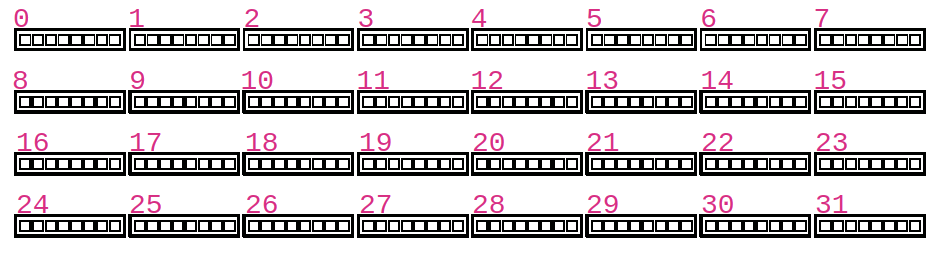
Each byte in the main memory has its address. The picture below shows the first 32 bytes of the main memory. Our programs will almost never have access to the bytes 0, 1, ... The addresses of the bytes that we will be allowed to use won't be small convenient numbers. We will also not be able to choose which bytes to use. The operating system is controlling numerous processes. Our program will be just one out of many such processes. The individual processes are assigned available bytes by the operating system. Whenever we execute a program and ask for main memory, we will receive the memory at a different address.
3. Integers in main memory
The integers in main memory are too big to fit in one byte. Each of the registers X0, X1, ..., X29, LR, and SP consists of 8 bytes (which is 64 bits). It is easiest to work with sequences of 64-bit integers.
It is possible to work with bigger integers, but then the programs have to be very complicated. We will have to make our custom functions for addition and multiplication. The CPU only supports the arithmetic operations on registers.
Therefore, each of our integers in the memory will occupy 8 bytes.
4. Arrays in assembly language
We are still not able to allocate the memory for arrays. We will learn in later sections how to make dynamic memory allocation. In this section we will assume that the memory for the array is allocated. Our practice problems will use the auto-grader. The auto-grader will do the proper memory allocation.
Let us now assume that the our program has obtained a permission from the operating system to use 20 integers. Each integer has length 8 bytes. Let us call these integers \(a_0\), \(a_1\), \(\dots\), \(a_{19}\). Of course, the assembly language would not allow us to write these symbols. These symbols are only for our illustrations. We will assume that the address of the first integer \(a_0\) is stored in the register X1. Then the next element of the sequence \(a_1\) is stored at the memory location X1+8. The element \(a_{17}\) is stored at the address X1+17* 8.
If we want to perform the assignment \(a_{15}= a_{17}+11\), then we would need to take the following steps:
- Step 1. Calculate the address of the term \(a_{17}\).
- Step 2. Load the term \(a_{17}\) from the main memory to one of the registers (say register
X5). - Step 3. Calculate the sum of
X5and11and store the result in one of the registers. We can still useX5to store this result of addition. - Step 4. Calculate the address of the term \(a_{15}\).
- Step 5. Store the content of
X5into the memory location occupied by \(a_{15}\).
The assembly code that performs the steps 1-5 is given below.
/* STEP 1 */
MOV     X2,      17
LSL     X2,      X2,      3      /* X1 = 8 * 17       */
ADD     X2,      X2,      X1     /* X2 = X1 + 8*17    */
/* STEP 2 */
LDR     X5,      [X2]            /* X5 = a[17]        */
/* STEP 3 */
ADD     X5,      11              /* X5 = a[17] + 11   */
/* STEP 4 */
MOV     X2,      15
LSL     X2,      X2,      3      /* X1 = 8*15         */
ADD     X2,      X2,      X1     /* X2 = X1 + 8*15    */
/* STEP 5 */
STR     X5,      [X2]
Assume that the register X1 contains the address
of the beginning of the block of memory that contains the sequence \(x_0\), \(x_1\), \(\dots\), \(x_{9}\) of integers. Assume that X2 contains an integer \(i\) from the set {0, 1, ..., 9}. Create a code that evaluates \(x_i+15\) and stores the result in the register X0.
Assume that the register X1 contains the address
of the beginning of the block of memory that contains the sequence \(x_0\), \(x_1\), \(x_2\), \(x_3\), \(x_4\) of integers. Create a code that evaluates the sum \(x_0+x_1+x_2+x_3+x_4\) and stores the result in the register X0.